Magento 2 layered navigation: letting shoppers pick more than one colour
A shopper picks Black in your colour filter and the whole filter vanishes, so Blue is out of reach. Here is why Magento's layered navigation works that way and what it takes to let people choose several options.
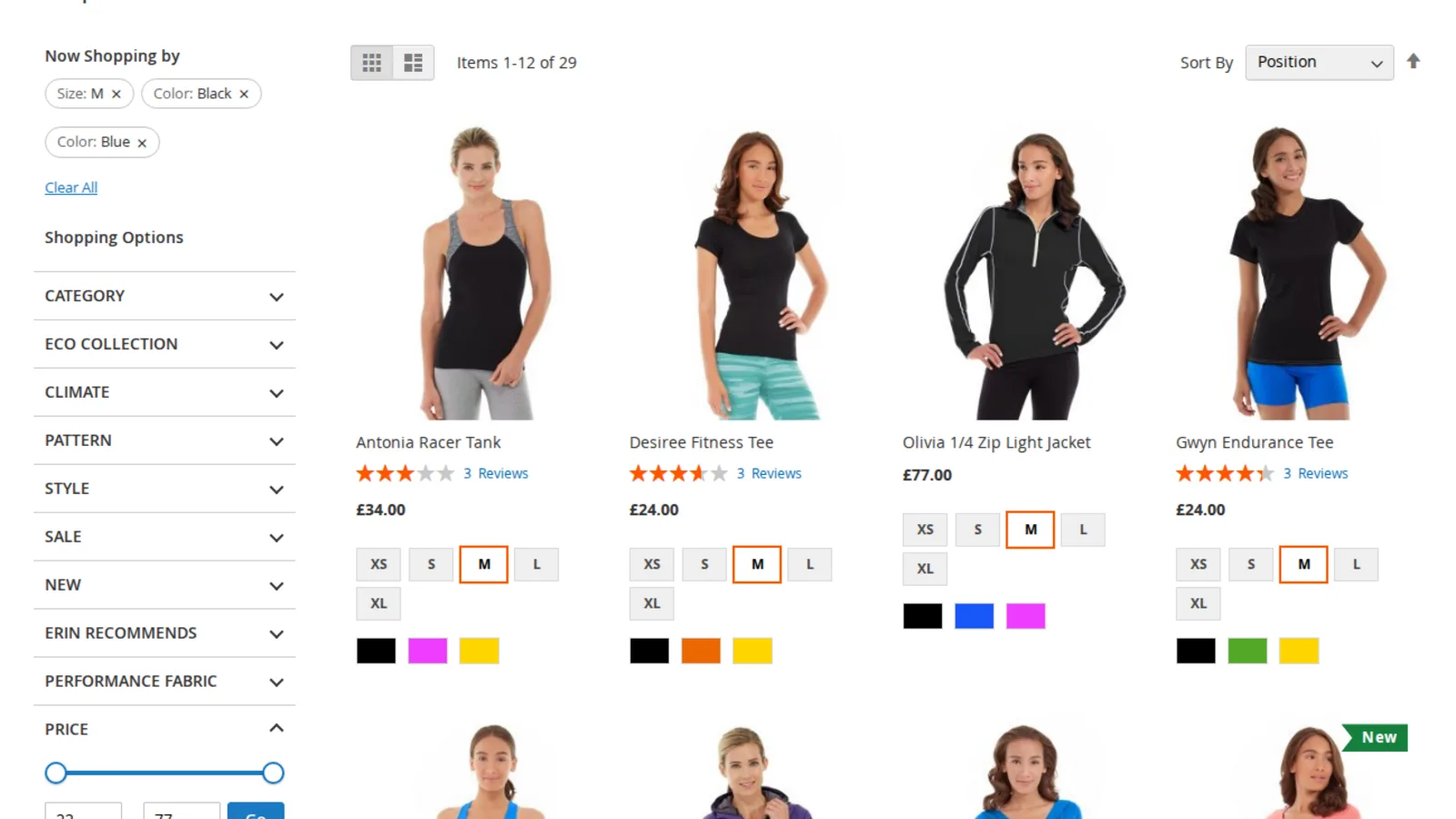
A shopper on a clothing store wants a T-shirt in size M, black or navy, she does not mind which. She opens Tops, clicks Black in the colour filter and gets a tidy list of black tops. Then she looks for Blue to add it, and the colour filter is gone. The only way to see the blue ones is to remove Black and start again, so she flicks between two lists, or leaves.
That is how Magento's layered navigation behaves out of the box, and it is a common reason to go looking for a "Magento 2 layered navigation extension". The short version: Magento's filters are single choice per attribute, and allowing several choices is not just a matter of turning links into checkboxes. The counts next to each option have to be worked out differently, and the filtered addresses need some thought too.
Why the filter disappears after one click
In Magento, each attribute you mark as "Use in Layered Navigation" becomes a filter on category pages, and with "Use in Search Results Layered Navigation" on the search results page too. You choose between "Filterable (with results)", which lists only options that have matching products, and "Filterable (no results)", which lists every option with its count1.
When a shopper picks an option, Magento adds that single value to the product collection, puts it into "Now Shopping by", and then empties the list of options for that filter. The code even says so in a comment: "set items to disable show filtering"2. The filter value travels in the address as the attribute code and the option ID, such as ?color=49, which is why there is room for one value and not two.
That suits attributes where one choice is the only sensible one, not colour, size or brand, where "this or that" is exactly what people mean.
What multi-select filters actually need
Ticking Black and Blue is the easy bit. The rules behind it are where filter modules differ:
- OR inside a filter, AND between filters. Black or Blue, and also size M. A filter that combines options of one attribute with AND would return products that are black and blue at the same time, which is almost never what anyone wants.
- Counts that stay honest. Once Black is selected, the number next to Blue should say how many more products Blue would add, not zero. If the counts are taken from the already filtered list, every other colour shows zero or disappears, and the shopper is back where she started.
- A clear way out. Each selected option needs its own remove link, plus a way to clear one filter or all of them.
- Addresses that still work. Every filtered list should have its own normal address, so the Back button, bookmarks and the full page cache keep working.
The counts are the part that is easy to get wrong. The correct numbers for the colour filter come from a search with every filter applied except colour itself. That is usually called a disjunctive count, and it means one extra query to the search engine for each attribute that already has a selection.
How we built it in Layered Navigation
Our Layered Navigation module replaces the filter block on category pages and on search results, on Luma and Hyvä. Options within one attribute are combined with OR and different attributes with AND. All counts come from OpenSearch or Elasticsearch, the same engine Magento already uses for the catalogue, so nothing is queried product by product. For the disjunctive counts the module makes one extra search request per filtered attribute, and we capped that at six per page so a shopper ticking every filter cannot multiply the work without limit.

Selected options appear as chips under "Now shopping by", each with a remove link, with "Clear All" above and a "Clear <filter>" link inside every filter that is in use. Colour, image and text swatch attributes keep their swatches and allow several choices. Price gets a slider with from and to boxes; numbers typed into the boxes are used as typed.
Filtering happens without a full page reload by default, but under the hood each click still loads an ordinary GET address and swaps in the same HTML a normal page load would return. That keeps the full page cache working, keeps Back and Forward working, and means the filters still work as plain links if JavaScript fails.
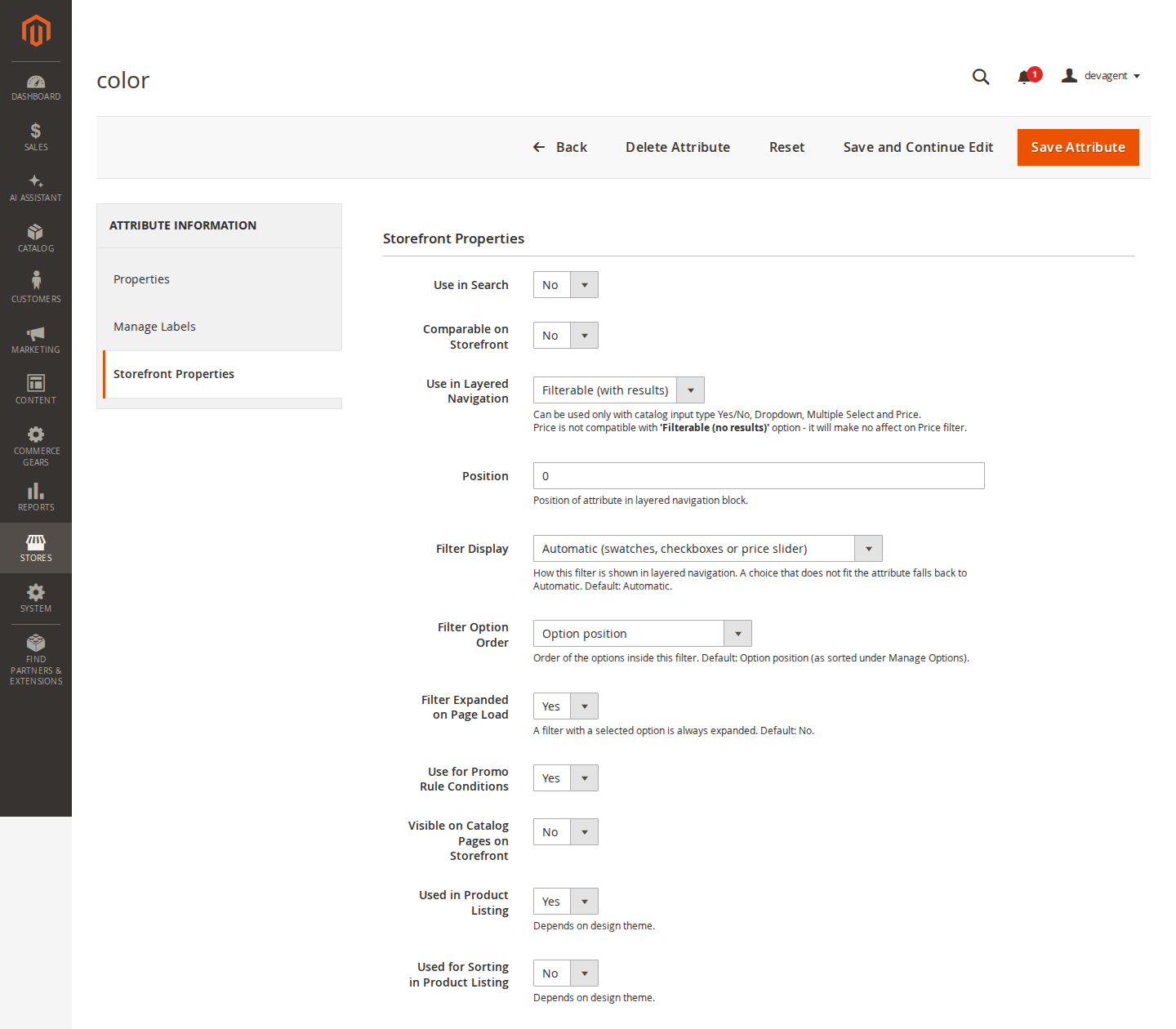
How each filter looks is set on the attribute itself, under Stores > Attributes > Product, tab Storefront Properties, below Magento's own "Use in Layered Navigation" and "Position" fields. You choose checkboxes, a dropdown (one option), swatches, a slider or Magento's price ranges, the order of options (admin position, name, or number of products) and whether the filter starts open.
Long lists get a "Show more" link after eight options and a search box once a filter has more than fifteen; both numbers are settings. On phones the whole block folds behind a "Shop By" bar with a badge showing how many filters are active.
Filter combinations and search engines
Multi-select filters create many more possible addresses. Five colours and five sizes, each allowing several choices, already give about a thousand combinations per category, and crawlers will happily follow every one of them. The module handles this in two ways.
Links that combine two or more filter values get rel="nofollow", so crawlers are not sent through every combination, while pages with a single filter value stay crawlable. Separately, there is an optional setting, off by default, for readable filter addresses on category pages: /women/tops-women.html?color=49,50&size=168 becomes /women/tops-women/color-black-blue/size-m.html. Options inside a segment are sorted, so each combination has exactly one address, and other orders and the old query-string addresses redirect to it with a 301. Price, sorting and paging stay in the query string. Real products, CMS pages and subcategories always win over a filter address that looks the same.
Readable addresses are not a ranking trick on their own. Whether a filtered page should be indexed at all, and what its canonical tag should point to, is a separate decision. If you use our SEO Suite, its robots and canonical rules for filtered category pages work with both address styles. And if a combination like "black women's tops" deserves its own page with its own heading and text, that is usually better served by a proper landing page than by a filter address.
Limits, and when the default is enough
The module has no stock status or rating filter in this version. Friendly addresses are for category pages only; search results keep query-string filters. The price slider needs JavaScript, although the other filters still work without it. If you rename an option, its automatic slug changes with it and the old friendly address returns a 404, unless you set a custom slug for that option first.
If your categories are small and each attribute has two or three options, Magento's own layered navigation is fine, and the free fixes from our post on Magento 2 site search (checking which attributes are filterable and in search) will do more than any extension. Multi-select filters earn their place when shoppers routinely mean "this or that": colours, sizes, brands, materials.
More detail and every setting are on the Layered Navigation page.
Sources
- Adobe Commerce Admin documentation, "Layered navigation", https://experienceleague.adobe.com/en/docs/commerce-admin/catalog/catalog/navigation/navigation-layered, checked 26 October 2026. ↩
- Magento Open Source 2.4.9 source code,
app/code/Magento/CatalogSearch/Model/Layer/Filter/Attribute.php(apply()filters by one value and callssetItems([]); the request variable is the attribute code, set inapp/code/Magento/Catalog/Model/Layer/Filter/AbstractFilter.php), checked 26 October 2026. ↩
From our shop
Related Products
-
Layered Navigation
Filters that shoppers actually use: several options per filter with correct counts, swatches, a price slider, Ajax updates and optional readable filter URLs, on Luma and Hyvä.
- Magento 2.4.6 – 2.4.9
- Hyvä
- Luma
- Version v2.0.3
$279
-
SEO Suite
Technical SEO for Magento 2 in one module: JSON-LD structured data, meta templates, canonical and robots rules, hreflang, Open Graph, a redirect manager with 404 log, XML sitemap extras and an SEO audit, for Luma and Hyvä.
- Magento 2.4.6 – 2.4.9
- Hyvä
- Luma
- Version v2.0.5
$199
-
Landing Pages
Landing pages that sell and rank: product lists by conditions at their own address, with the filters and sorting of your category pages, texts per store view and SEO safeguards for generated pages.
- Magento 2.4.6 – 2.4.9
- Hyvä
- Luma
- Version v1.1.2
$179