How to comply with the Omnibus Directive in Magento 2: the 30-day lowest price
When a Magento store in the EU shows a reduced price, it must also show the lowest price of the 30 days before the reduction. Magento does not do this on its own. What the rule says, where Magento gets in the way, and how to set it up.
If your Magento 2 store sells goods to consumers in the EU and announces a price reduction, it must show the prior price next to the reduced one: the lowest price you charged for that product in at least the 30 days before the reduction started1. Any percentage you show has to be worked out from that prior price, not from the regular price23. Magento Open Source and Adobe Commerce have no built-in feature for this. You either keep the price history and the text up to date yourself, or you use an extension that records prices and displays the line for you.
This post explains the rule using the official texts, shows where Magento's own price display gets it wrong, and ends with a checklist. It is written by the team that makes the Omnibus extension for Magento mentioned at the end, so read the product part with that in mind. It is not legal advice; which national rules apply to your shop is a question for your adviser.
A kettle, a weekend sale and Black Friday
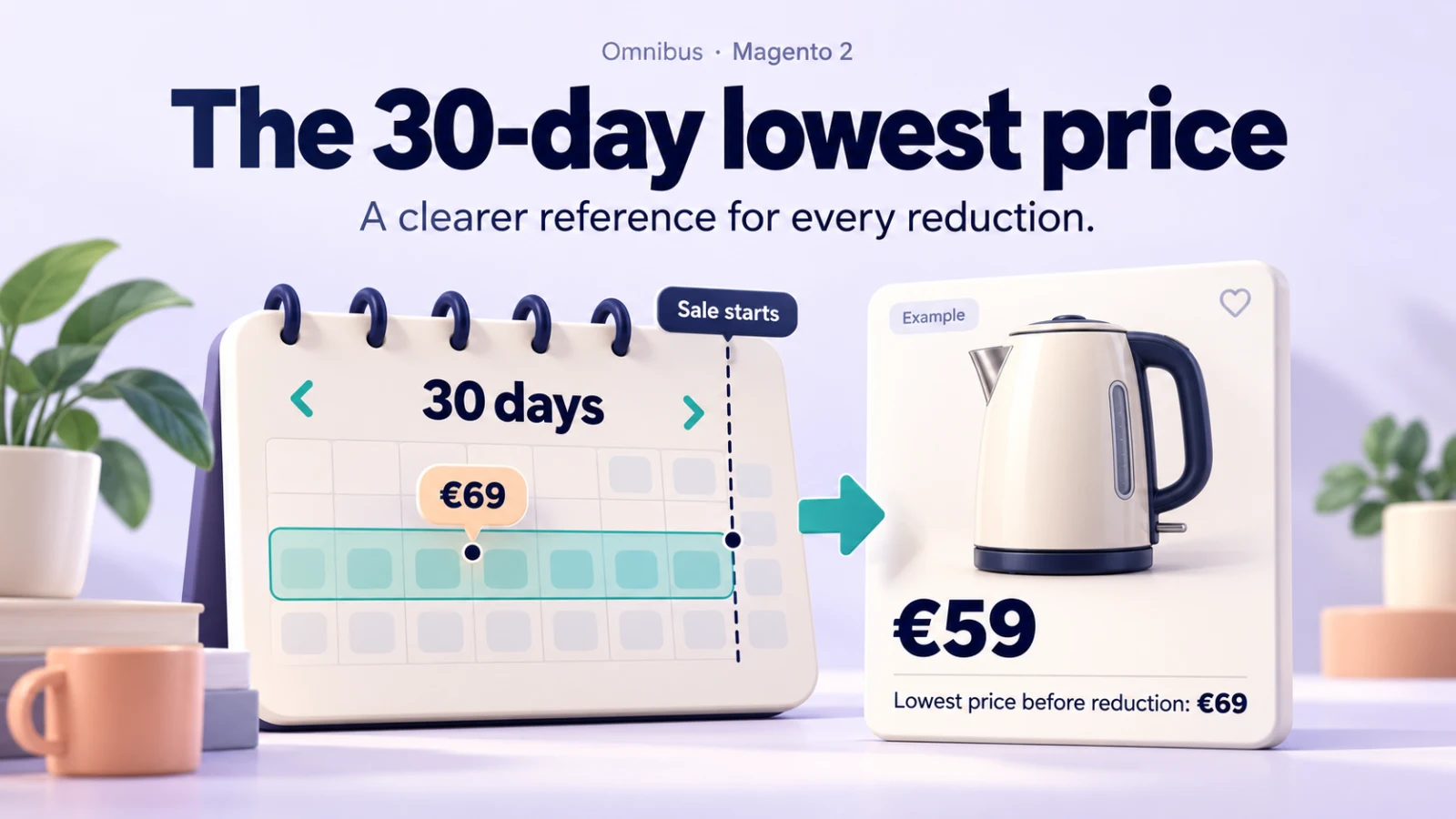
Take a kettle with a regular price of €89. On 3 November you put it on a weekend sale at €69 and it goes back to €89 on 10 November. On 28 November, Black Friday, you set a special price of €59, and Magento's product page shows €59 with €89 struck through. A sale label says −34%.
Under EU rules, almost every part of that display is wrong. The lowest price in the 30 days before 28 November was €69, from the weekend sale. That is the prior price, so the page should say something like "Lowest price in the 30 days before the reduction: €69", and if it shows a percentage, the honest figure is −14%, not −34%. The Commission's guidance says this in so many words: the lowest price "shall include any previous 'reduced' price during that period"2, and leaving out earlier promotions is "contrary to Article 6a".
Nothing in Magento knows about the weekend sale any more. Once the special price has gone, the old value is overwritten. That, in short, is why this rule is harder in Magento than it sounds.
What Article 6a actually says
The rule is Article 6a of the Price Indication Directive 98/6/EC, added by the Omnibus Directive (EU) 2019/2161 and applied across the EU from 28 May 202212. It is short enough to quote in full where it matters:
1. Any announcement of a price reduction shall indicate the prior price applied by the trader for a determined period of time prior to the application of the price reduction. 2. The prior price means the lowest price applied by the trader during a period of time not shorter than 30 days prior to the application of the price reduction.
Paragraphs 3 to 5 then let each Member State make its own choices for goods that spoil quickly, for products on the market for less than 30 days, and for reductions that get deeper step by step1. That is where national law starts to differ, and we come back to it below.
The Commission published guidance on Article 6a in December 2021 (OJ C 526, 29.12.2021, reference 2021/C 526/02)2. It is not binding, but it answers most of the questions a shop owner will have. The points that matter most online:
What counts as an announcement. A struck-through "was" price, "20% off", "€10 off", "Sale", "Special offer" and "Black Friday offers" all count, even when no figure is given2. A product that is simply cheaper than last month, with no claim of a reduction, is not covered: Article 6a does not restrict price changes as such.
Which 30 days. The 30 days before the reduction starts, not the 30 days before today. The prior price is set at the start and "they can keep it throughout the entire period of the price reduction", even if the reduction runs for more than 30 days2. A rolling "lowest price of the last 30 days" that changes every morning while the sale price stays the same is not what the text describes, and it is one of the things the Polish authority objected to in its 2026 decision against Temu4.
Percentages. "Any indicated percentage reduction must be based on the 'prior' price"2. The Court of Justice confirmed this in the Aldi Süd case in September 2024: a reduction announced as a percentage, or with a statement highlighting how good the price is, "must be determined on the basis of the 'prior price'"3. In that case bananas were advertised at €1.29 with €1.69 struck through, while the lowest price in the previous 30 days had also been €1.29.
Other reference prices. You may still mention a regular price or a recommended retail price, but only if it is clearly explained, does not confuse, and does not take attention away from the prior price2. In practice, a struck-through €89 next to a small-print €69 is the kind of display that invites trouble.
Channels. If you sell the same product in different shops or channels at different prices, the prior price is worked out per channel2. In Magento terms, that maps most naturally onto websites.
Goods only. Article 6a covers goods, not services or digital content2. Some countries go further; Poland applies its rule to services as well5.
The cases the guidance spells out
Reductions that get deeper
A product goes from €100 to €90, then €80, then €70 in one uninterrupted sale. If your country uses the option in Article 6a(5), the prior price stays at the lowest price before the first step (€100) for the whole campaign12. The guidance reads this narrowly: it only applies when the price falls step by step without interruption. "20% off every Sunday in December" or a run of Singles Day, Black Friday and Cyber Monday sales with full prices in between are separate reductions, and each new one has to count the earlier sale prices2. That is the kettle example above.
Perishable goods
Member States may set different rules for goods "liable to deteriorate or expire rapidly", up to exempting them completely1. The guidance limits this to goods that physically spoil, such as fresh food with a short shelf life. Seasonal clothing does not qualify, however much it feels like it in March2.
New products
For products on the market for less than 30 days, Member States may allow a shorter period1. They can set the period, or let traders choose one and show it with the prior price. A product that was out of stock and comes back is not new2.
Loyalty programmes and personal discounts
Real loyalty schemes and personal reductions are outside Article 6a: a birthday voucher, a "20% off your next order" code after a purchase, a discount card2. But the guidance's own examples, "Today 20 % off when using the code XYZ" and "This weekend 20 % off on everything for loyalty members only", are covered when the code or membership is available to many or most customers. The prior price is then the lowest publicly available price2.
General announcements
A banner saying "20% off all Christmas decorations" does not have to carry prices itself. The prior price must be shown at the point of sale, which online means the price area of each product2.
Member State differences
National choices differ, so check each country you sell into. Two we checked:
Germany implements Article 6a in § 11 of the Price Indication Ordinance (Preisangabenverordnung, PAngV). It requires the lowest total price of the 30 days before the reduction, allows the price before the start of an uninterrupted step-by-step reduction to be kept, and does not apply to individual price reductions or to perishable goods reduced because they are about to spoil, when that is clearly indicated6. We read § 11 on a mirror of the official text because gesetze-im-internet.de could not be reached from our server on the day we checked; please confirm on the official site.
Poland applies the rule to goods and services, uses the lowest price from the first day of sale for products sold for less than 30 days, and lets perishable goods show the price before the first reduction (Article 4(2) to (5) of the Act on informing about prices of goods and services, according to the consumer authority UOKiK)5. Poland also shows what enforcement looks like: in January 2026 UOKiK announced fines of nearly PLN 31 million for Zalando and nearly PLN 6 million for Temu's operator, for missing or wrong 30-day prices among other things. Both decisions were not final when announced4.
We have not checked the other Member States, and we would rather say so than repeat second-hand summaries. If you sell into Italy, France, Spain or elsewhere, ask your adviser or the national consumer authority for the current rule.
The United Kingdom is different
Great Britain is not covered by Article 6a. There is no fixed 30-day period. Reference prices are judged under the general ban on misleading actions in the Digital Markets, Competition and Consumers Act 2024 (section 226)8, and the Chartered Trading Standards Institute's Guidance for Traders on Pricing Practices, last updated in April 2026, explains how7. It asks, among other things, how long and how recently the higher price applied, whether it was charged in the same outlet, and whether there have been "intervening prices". A UK store needs no "lowest price in 30 days" line, but it must be able to show that a "was" price was genuine.
Why Magento gets this wrong out of the box
Magento has several ways of reducing a price, and none of them keeps a history.
A special price is a product attribute with optional from and to dates. When it is set and lower than the price, the Luma price box shows the special price with the regular price struck through. That struck-through figure is the price attribute, not the lowest price of the last 30 days. In the kettle example, Magento shows €89.
A catalogue price rule (Marketing > Catalog Price Rule) lowers the final price per website and customer group. It is applied by the indexer and by a daily cron job, catalogrule_apply_all, scheduled for 01:00 by default9. A rule with dates can start a reduction overnight without anyone touching a product.
Cart price rules and coupons do not change the product price at all; they apply in the cart. If you announce "20% off everything with code AUTUMN20" to all visitors, the guidance says Article 6a applies2, but Magento has no product-level price to attach a prior price to. That one needs thought about how you word and show the offer.
We checked the Magento Open Source 2.4.9 code: there is no price history, no "lowest price" display and no setting for this9. We have not seen an Adobe Commerce feature for it either, but check with Adobe if you run that edition. You also cannot rebuild the history after the fact, because Magento overwrites old values. If you want to compare a price with the one from three weeks ago, something has to have written it down three weeks ago. (Our post on who changed a product price covers what Magento records on its own.)
Doing it by hand
For a small catalogue with rare sales, a manual process can work. Before each reduction, look up the lowest price of each product in the 30 days before the start, earlier sale prices included, and keep the evidence. Then put the prior price on the product page, which in Magento usually means a custom attribute and a template change, and remember to remove it when the sale ends.
It breaks down with volume. Catalogue rules switch on at night, imports change prices in bulk, and a busy November can stack three campaigns within 30 days. The spreadsheet is only as good as the last person who updated it.
Doing it with an extension
An extension has two separate jobs: record prices continuously, from well before the reduction you are worried about, and change what the storefront shows. When you compare options (see our comparison of Magento 2 Omnibus extensions), these are the questions we would ask.
Does it keep its own price history, or does it read the price attribute and call that the prior price? Does it fix the prior price when the reduction starts, or recalculate a rolling 30 days every morning? Does it notice catalogue price rules and dated special prices that change overnight, not only product saves? Does it handle websites, configurable variants and product lists? What does the sale label's percentage use? And what happens to reductions already running on the day you install it?
Our own module, Omnibus: Lowest Price & Price History (incl. GPSR), works like this. It records final and regular prices from Magento's price index after every price reindex and once a day, per website, for the NOT LOGGED IN customer group by default (all groups optionally), storing only changes. When a reduction starts, it stores the lowest final price of the 30 days before, earlier reductions included, and keeps it while the reduction lasts, also when it gets deeper. The line "Lowest price in the 30 days before the reduction: €69" appears near the price on product pages and lists, on Luma and Hyvä, and follows the selected variant of a configurable product10.
The setting Struck-through Price Is the Prior Price, on by default for the EU rules, applies the Aldi Süd ruling: the struck-through price and the optional percentage are based on the prior price, and when a product is not cheaper than its prior price no reduction is shown at all. A product created with a special price was never sold at a higher price, so it announces no reduction. For new products with a short history, the text names the real period, for example "in the 12 days". Rules are chosen per store view from its country: EU and EEA countries get the 30-day rules, the United Kingdom and other countries are off by default10. Categories with perishable goods can be excluded.
In the admin, a Price History grid lists every recorded change, and an Active Reductions grid shows each running reduction with its prior price and what the shop displays, for example "Not announced: not below the prior price". The point of that second grid is to look at it before a campaign goes live, because a wrong prior price is much easier to fix on a Thursday than to explain on the Monday after Black Friday.
There are limits, and they are in the user guide11. Tier prices and cart price rules are not recorded. Bundle products are recorded but show no line, because a bundle price is a range. And on the day you install it, the module cannot know the prices before that day: for reductions already running you either confirm that the regular price applied before (one button, or a CLI option) or import your past prices from a CSV file. If you show sale percentages with our Product Labels module, both use the same rounding and the same prior price, so the label and the line agree (Product Labels 2.0.3 or later, with the setting above switched on).
Checklist
- List every way a price can be reduced in your store: special prices, catalogue price rules, coupons announced to everyone, imports, integrations.
- Start recording prices now, before your next campaign. History you did not record cannot be rebuilt.
- Decide the rules per store view and country, and check national choices (new products, perishable goods, step-by-step reductions).
- Make sure the prior price is fixed at the start of each reduction and includes earlier sale prices in the 30 days before.
- Base every percentage and every struck-through price on the prior price, or explain any other reference price clearly.
- Check product lists, configurable variants, sale labels, banners and feeds, not just the product page.
- Keep the history for as long as you may need to show how a prior price was calculated.
- For UK store views, follow the CTSI pricing guidance instead of the EU rule.
Frequently asked questions
Does the Omnibus Directive apply to my Magento store?
If you sell goods to consumers in the EU and announce price reductions, Article 6a applies to you, including when you are based outside the EU and target EU customers2. It does not apply to pure B2B sales, services or digital content, although national law can be wider (Poland includes services)5.
Is the 30-day period counted from today or from the start of the sale?
From the start of the reduction. You may keep the same prior price for the whole sale, even beyond 30 days2.
Do I have to show the lowest price on product listing pages too?
The guidance says the prior price must be shown at the point of sale, on the price section of the online shop2. If a listing page shows a reduced price or a struck-through price, it is safest to show the prior price there as well.
What about a product I launched at an introductory price?
The guidance covers the case where a trader starts with a low price, announces a higher "upcoming" price, charges it for less than 30 days and then announces a reduction: the prior price is still the lowest price of the last 30 days, which is the starting price2.
Does any of this apply in the UK?
Not Article 6a. Great Britain uses the DMCC Act 2024 and the CTSI pricing guidance, which has no fixed period but asks whether a reference price was genuine and recent78.
For the product safety information EU shops must show on the same product pages, see GPSR for Magento 2. The Omnibus product page and the user guide describe every setting.
Sources
- Directive (EU) 2019/2161 of 27 November 2019, Article 2, inserting Article 6a into Directive 98/6/EC, https://eur-lex.europa.eu/eli/dir/2019/2161/oj, checked 22 October 2026. ↩1 ↩2 ↩3 ↩4 ↩5 ↩6
- European Commission, "Guidance on the interpretation and application of Article 6a of Directive 98/6/EC", OJ C 526, 29.12.2021, p. 130 (2021/C 526/02), sections 1.1, 1.2, 2.1, 2.2, 2.3, 4.1, 4.2 and 4.3, https://eur-lex.europa.eu/legal-content/EN/TXT/?uri=CELEX:52021XC1229(06), checked 22 October 2026. ↩1 ↩2 ↩3 ↩4 ↩5 ↩6 ↩7 ↩8 ↩9 ↩10 ↩11 ↩12 ↩13 ↩14 ↩15 ↩16 ↩17 ↩18 ↩19 ↩20 ↩21 ↩22
- Court of Justice of the European Union, judgment of 26 September 2024, Case C-330/23, Verbraucherzentrale Baden-Württemberg v Aldi Süd, https://eur-lex.europa.eu/legal-content/EN/TXT/?uri=CELEX:62023CJ0330, checked 22 October 2026. ↩1 ↩2
- UOKiK (Polish Office of Competition and Consumer Protection), "Is the discount obvious to everyone? Not necessarily. Lowest price in the 30 days before the discount: penalties for Zalando and Temu", 14 January 2026, https://uokik.gov.pl/en/is-the-discount-obvious-to-everyone-not-necessarily-lowest-price-in-the-30-days-before-the-discount-penalties-for-zalando-and-temu, checked 22 October 2026. ↩1 ↩2
- UOKiK, "Informacje o obniżkach cen", https://prawakonsumenta.uokik.gov.pl/prawo-do-informacji/informacje-o-obnizkach-cen/, citing Article 4(2) to (5) of the Act of 9 May 2014 on informing about prices of goods and services, checked 22 October 2026. ↩1 ↩2 ↩3
- Preisangabenverordnung (PAngV), § 11 "Zusätzliche Preisangabenpflicht bei Preisermäßigungen für Waren", official text https://www.gesetze-im-internet.de/pangv_2022/__11.html (not reachable from our server on 22 October 2026; read on the buzer.de mirror, https://www.buzer.de/s1.htm?a=11&g=PAngV). Please confirm against the official text. ↩
- Chartered Trading Standards Institute, "Guidance for Traders on Pricing Practices" (updated April 2026), https://www.businesscompanion.info/en/guidance-for-traders-on-pricing-practices, checked 22 October 2026. ↩1 ↩2
- Digital Markets, Competition and Consumers Act 2024, section 226 "Misleading actions", https://www.legislation.gov.uk/ukpga/2024/13/section/226, checked 22 October 2026. ↩1 ↩2
- Magento Open Source 2.4.9 source code: no price history or prior price feature in
app/code/Magento;app/code/Magento/CatalogRule/etc/crontab.xml, jobcatalogrule_apply_allat0 1 * * *, checked 22 October 2026. ↩1 ↩2 - CommerceGears, "Omnibus: Lowest Price & Price History (incl. GPSR)" product page, https://commercegears.com/magento-2-extensions/omnibus-gpsr/, version 2.3.0, checked 22 October 2026. ↩1 ↩2
- CommerceGears, Omnibus user guide, sections "Lowest price before a reduction" and "Limits", https://commercegears.com/user-guides/magento-2-extensions/omnibus-gpsr/, checked 22 October 2026. ↩
From our shop
Related Products
-
Omnibus: Lowest Price & Price History (incl. GPSR)
Show the lowest price of the last 30 days before every reduction (EU Omnibus rule), from a price history the module records itself, with a Price History log and an Active Reductions check in your Magento admin. GPSR product safety information is also included.
- Magento 2.4.6 – 2.4.9
- Hyvä
- Luma
- Version v2.3.1
$213
-
Product Labels
Rule-based product labels for Luma and Hyvä: sale, new, low stock and best seller badges on category pages, widgets and the product page, assigned by an indexer.
- Magento 2.4.6 – 2.4.9
- Hyvä
- Luma
- Version v2.0.4
$149
-
Promo Flash Sale
Countdown timers, listing badges, a campaign bar and a widget that follow the real dates of your promotions, never a fake deadline.
- Magento 2.4.7 – 2.4.9
- Hyvä
- Luma
- Version v1.2.0
$149