Magento 2 order grid: seeing items, coupons and order notes without opening every order
Packing from the Magento order grid means opening one order after another to see what is in it. Here is what the grid can show on its own, what it cannot, and a free way to add the missing columns.

It is half past eight, the courier comes at eleven, and the person packing today works from Sales > Orders. The grid shows order numbers, names, totals and statuses. It does not show what is in each order, whether the customer left a note about the delivery, or which orders are the three test orders the developer placed yesterday. So they click into an order, read it, go back, and click into the next one.
That is a small problem repeated many times a day. Our Order Tools module, which is free, adds the missing columns and a few other order utilities. This post starts with what Magento already offers, because some of what people look for is there and hidden.
What the order grid can already show
The Columns menu above the order grid holds more than its default view suggests. Next to ID, dates, names, totals and status you can switch on Billing Address, Shipping Address, Shipping Information, Customer Email, Customer Group, Subtotal, Shipping and Handling, Customer Name, Payment Method and Total Refunded1. If your question is "which orders went by express shipping" or "which were paid by bank transfer", try the Columns menu before installing anything.
What is not in that list: the products in the order, the coupon code and the customer's order comment. Magento stores the comment on the order as customer_note2, and admin order comments and many checkout comment modules write to it, but the grid has no column for it. The Mass Actions menu has Cancel, Hold, Unhold, the PDF prints and shipping labels, and no way to delete an order1.
Adding the missing columns
Order Tools adds four optional columns, each switched on separately under Stores > Configuration > CommerceGears > Order Tools:
- Items: "SKU x qty" for the order's top-level items;
- Coupon Code: the code used on the order;
- Shipping Country: with a select filter;
- Order Comment: the order's customer note.
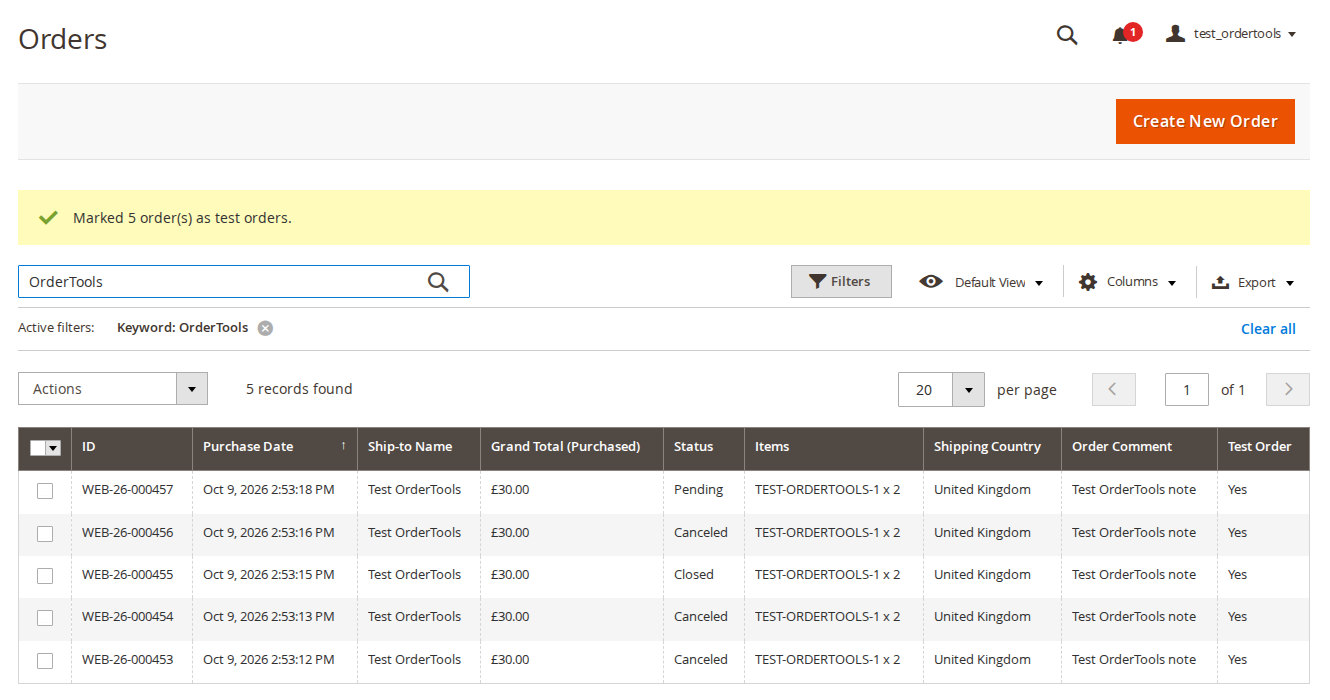
They can be shown, hidden and filtered like Magento's own columns, so "all orders with coupon SUMMER10 shipped to Ireland" is a filter rather than an export. We fill them through Magento's own order grid indexer, the same mechanism that fills the standard columns, so they stay current whether your store uses synchronous or asynchronous grid indexing3. For orders placed before installation, one command fills them in: bin/magento commercegears:order-tools:grid:backfill. Payment method, shipping information and customer group are left out on purpose, since Magento already has them.
If your checkout does not collect a delivery note at all, the Order Comment column will be empty; collecting one is a checkout question, not a grid question.
Test orders, and getting rid of them
Shops place test orders all the time: to try a payment method, check an email template or show a new colleague the checkout. They end up in the grid with real ones, and on a busy day someone packs one.
With the Test Order Flag on, you select orders in the grid and choose Mark as Test Order (or Unmark Test Order). A Test Order column with a filter shows them, and the flag travels with them if they are ever deleted.
Magento Open Source has no way to delete an order from the admin1, which is a sensible default: orders are accounting records. Still, cancelled test orders and obvious junk clutter reports and searches, and deleting them in the database by hand is how people lose real data. Order Tools adds a Delete Permanently action, switched off by default and guarded on the server for every single order:
- "Allow Deleting Orders" has to be switched on.
- The admin role needs its own permission, Delete Orders, which is not added to any role automatically.
- The order's current status must be in the allowed list, which by default is Canceled only. The status is checked again with a row lock just before deleting, so an order that changed in the meantime is skipped.
- At most 200 orders per request, after a confirmation dialog.
Deleting removes the order with its invoices, shipments, credit memos, items, addresses, payment records and comments. It restores nothing: no stock, no refunds, no store credit. Cancel and refund first if you need that. Sales reports keep their totals until they are refreshed. There is no command line option for deleting, on purpose.
Every deletion is written to a Deleted Orders Log with the order number, store view, status, grand total, the deleted document numbers, the admin user, IP address and time. The customer's email is stored as a SHA-256 hash by default, and you can still search the log by email address. The log is read-only in the admin and can be exported as CSV.

If you are deleting an order because a customer asked to erase their data, read our post on deleting a customer while keeping the orders first. Orders often have to stay for tax reasons, and removing the personal data from them is a different task.
Order numbers while you are there
The grid in the screenshot shows numbers like WEB-26-000457. Order Tools can also set your own order, invoice, shipment and credit memo numbers per store view: a prefix and suffix with placeholders such as {yy} and {store_id}, zero padding, a start value and step, and an optional yearly or monthly restart that is only allowed when the number contains the period, so a number can never repeat. Invoices can use the order number instead. Existing documents are never renumbered, and if a custom number cannot be built, Magento's own number is used and the error logged, so a checkout never fails over numbering.
Limits
Everything that changes behaviour is off after installation. Orders edited in the admin keep Magento's own behaviour of adding -1, -2 to the old number. On Adobe Commerce, admin role scopes were not tested with deleting, so give Delete Orders only to roles with access to all websites. Behind a proxy or CDN, the IP address in the log is only right if your web server passes the real visitor IP.
If you want to see who changed an order or a setting more generally, not only who deleted one, that is what an admin activity log is for. For the grid columns, test orders and numbering, the Order Tools page has the user guide and an admin demo.
Sources
- Magento Open Source 2.4.9 source code,
app/code/Magento/Sales/view/adminhtml/ui_component/sales_order_grid.xml(grid columns and mass actions: cancel, hold, unhold, PDF invoices, shipments, credit memos and all documents, print shipping labels), checked 26 October 2026. ↩1 ↩2 ↩3 - Magento Open Source 2.4.9 source code,
app/code/Magento/Sales/etc/db_schema.xml(columncustomer_noteonsales_order), checked 26 October 2026. ↩ - Magento Open Source 2.4.9 source code,
app/code/Magento/Sales/etc/adminhtml/system.xmlandapp/code/Magento/Sales/etc/config.xml(dev/grid/async_indexing, default 0), checked 26 October 2026. ↩
From our shop
Related Products
-
Order Tools
Your own order, invoice, shipment and credit memo numbers, useful extra columns in the order grid, a test order flag and carefully guarded order deletion with an audit log.
- Magento 2.4.6 – 2.4.9
- Hyvä
- Luma
- Version v2.0.2
Free
-
Admin Activity Log
See who changed what in the Magento admin, with old and new values, plus every admin sign-in, the active sessions and alerts for suspicious sign-ins.
- Magento 2.4.6 – 2.4.9
- Hyvä
- Luma
- Version v2.0.3
Free
-
Checkout Fields
Add your own fields to the Magento checkout without code, such as a delivery date, PO number, order comment or a dropdown, and find the answers on the order, in the order grid, in emails and on the invoice PDF.
- Magento 2.4.6 – 2.4.9
- Hyvä
- Luma
- Version v2.1.1
$119