E-invoicing: Germany (XRechnung, ZUGFeRD) for Magento 2

XRechnung 3.0 and ZUGFeRD for Magento 2: your invoices and credit memos become German e-invoices, checked before they go out. Businesses get a ZUGFeRD PDF in a clear German invoice layout with the XML inside, public bodies an XRechnung with their Leitweg-ID. One-off payment, no subscription.

  • Magento 2.4.7 – 2.4.9
  • PHP 8.2 – 8.5
  • Hyvä and Luma
  • Version 2.2.2
$199

One-off payment, with 12 months of updates.

What is included

  • Install with Composer, or download a zip from your account
  • Licence for one production domain, staging and development copies included

No subscription or automatic renewal. Keep using the versions included in your update period. Update and licence details

Key features

  • XRechnung 3.0 in UBL and CII
  • ZUGFeRD PDF/A-3 with EN 16931 or XRECHNUNG XML
  • German invoice layout with the § 14 UStG details
See all features

Composer package commercegears/module-e-invoicing-de

E-invoicing: Germany (XRechnung, ZUGFeRD) $199

German e-invoices from your own Magento invoices. Every invoice and credit memo becomes a ZUGFeRD PDF or an XRechnung 3.0, checked against the EN 16931 and XRechnung rules before it goes out. Your business customers receive a clear German invoice ("Rechnung") with the structured XML embedded, attached to Magento's invoice e-mail and ready to download in My Account. Public bodies with a Leitweg-ID get an XRechnung. No network contract is needed for e-mail delivery.

Why now: German businesses must be able to receive e-invoices since 1 January 2025. Issuing them is required from 1 January 2027 for businesses with a prior-year turnover above EUR 800,000 and from 1 January 2028 for everyone. Check your own obligations with your tax adviser.

How it works

  1. Invoice in Magento as usual. When an invoice or credit memo is saved, the module queues an e-invoice for it. Cron creates it, so checkout and invoicing are never slowed down.
  2. The right format for each buyer. German businesses get a ZUGFeRD PDF (profile EN 16931). A buyer whose reference is a Leitweg-ID with valid check digits counts as a public body and gets an XRechnung 3.0. You can change the rules per buyer country and buyer type.
  3. Checked, stored and delivered. The EN 16931 and XRechnung rules, the XML schema and a total check run on every document; problems are listed with their rule ID. Files are stored once with a SHA-256 checksum, attached to the invoice e-mail and offered in My Account on Luma and Hyvä.

Don't take our word for it: check the files yourself
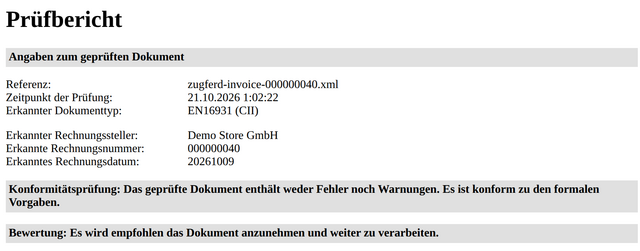
KoSIT validator report: no errors, no warnings, recommended to accept

We ran e-invoices of the demo store's orders through the official KoSIT validator (version 1.6.3, XRechnung 3.0.2 configuration of 31 August 2026), the validator of the German Coordination Office for IT Standards. Result for each file: "Das geprüfte Dokument enthält weder Fehler noch Warnungen" (no errors, no warnings) and "Es wird empfohlen das Dokument anzunehmen" (recommended to accept).

The ZUGFeRD PDFs also pass veraPDF (PDF/A-3B) and the ZUGFeRD rules in the open-source Mustang validator. Download the files below and check them with any validator you trust.

See what you get before you buy

Files made by the module from the demo store's orders (demo data: fictitious companies, example addresses):

What your customer receives

The ZUGFeRD PDF is drawn from the same data as the XML inside it, so the readable invoice and the structured data cannot differ. It is in German with small English sub-labels and shows the details § 14 UStG asks for: both VAT IDs, invoice and supply date, items with quantity and VAT rate, VAT per rate, the notes for reverse charge, intra-Community supplies and exports, payment terms and bank details, plus your PDF logo. Prefer your store's own invoice PDF, for example from a PDF module? Switch to it in the settings.

Who it is for

German sellers on Magento 2, and sellers elsewhere with German business or public customers, who issue their invoices in Magento and want them as compliant e-invoices automatically, for a one-off payment, no subscription. Invoice data stays on your server.

Look elsewhere if you need to receive and book purchase invoices or archive documents for the retention period: that is a job for your accounting or archive software.

Scope and compatibility

  • Formats: XRechnung 3.0 in UBL (invoice and credit note) and CII; ZUGFeRD PDF/A-3 with the profiles EN 16931 and XRECHNUNG; invoices and credit memos.
  • Buyers: VAT ID and "Leitweg-ID or your order reference" at checkout, German VAT IDs checked as typed, details correctable on the order page; the buyer reference (BT-10) is always filled.
  • Delivery: ZUGFeRD attached to Magento's invoice and credit memo e-mails, downloads in My Account and the admin. XRechnung over Peppol needs the separate E-Invoicing: Peppol package and a contract with a Peppol access point; without it, you download the XRechnung for the buyer's portal.
  • Not included: receiving purchase invoices, a direct connection to public-sector portals, archiving, and the MINIMUM and BASIC WL profiles (not e-invoices under German rules).

Magento Open Source or Adobe Commerce 2.4.7 – 2.4.9, PHP 8.2 – 8.5, Hyvä and Luma. Try it in the live demo: the Luma storefront, the Hyvä storefront and the admin. Test with your own invoice data and your customers' software before going live.

  • Ready for the German mandate

    Every Magento invoice and credit memo becomes a ZUGFeRD or XRechnung e-invoice by cron, without slowing down checkout or invoicing.

  • Checked before it goes out

    EN 16931 and XRechnung rules, the XML schema and a total check run on every document; problems are listed with their rule ID.

  • Businesses and public bodies

    Businesses get ZUGFeRD by e-mail; buyers with a Leitweg-ID get an XRechnung, over Peppol when the Peppol package is installed.

All features

What is included

German formats

  • XRechnung 3.0 UBL (invoice and credit note)
  • XRechnung 3.0 CII
  • ZUGFeRD profile EN 16931 (factur-x.xml in PDF/A-3)
  • ZUGFeRD profile XRECHNUNG (xrechnung.xml in PDF/A-3)
  • German invoice layout (Rechnung), or Magento's own invoice PDF

XRechnung rules

  • BR-DE-1 payment instructions and BR-DE-2 seller contact
  • BR-DE-15 buyer reference, always filled
  • BR-DE-16 VAT ID or tax number
  • BR-DE-19 and BR-DE-23 IBAN for credit transfers
  • Electronic addresses of seller and buyer
  • Leitweg-ID and German VAT ID check digits

Buyers and delivery

  • Leitweg-ID as buyer reference (BT-10) for public bodies
  • Order reference or order number when there is no Leitweg-ID
  • ZUGFeRD attached to Magento's invoice and credit memo e-mails
  • XRechnung over Peppol with the Peppol package (Leitweg-ID as Peppol ID 0204)
  • Download for upload to a buyer's portal

From E-Invoicing Core (free)

  • Queue and cron, never slowing down checkout
  • Admin grid, document page and audit trail
  • Files stored once with SHA-256 checksums
  • Optional check with your own KoSIT validator
  • CLI commands and separate ACL permissions

Feature tour

Everything your shoppers and your team see

01 / 06

A German invoice with the XML inside

The ZUGFeRD PDF your customer opens: "Rechnung" with English sub-labels, both VAT IDs, invoice and supply date, VAT per rate, payment terms and bank details. It is drawn from the same data as the embedded XML, so the two cannot differ.

02 / 06

Accepted by the official KoSIT validator

Every document is checked in your store against the EN 16931 and XRechnung rules before it is sent. The demo's files also pass the official KoSIT validator with the XRechnung 3.0.2 configuration.

03 / 06

VAT ID and Leitweg-ID at checkout

Buyers tick "This is a business purchase" and enter their VAT ID and order reference. For German addresses the field is labelled "Leitweg-ID or your order reference"; German VAT IDs are checked as typed.

04 / 06

ZUGFeRD and XML downloads for your customers

Logged-in customers download the ZUGFeRD PDF and its XML, or the XRechnung XML, on the order's Invoices and Refunds tabs, on Luma and Hyvä.

05 / 06

Status, checks and checksums

Each document shows its format, delivery, status, validation result, SHA-256 checksums of the files and the audit trail, with the real files to download.

06 / 06

XRechnung for public bodies

A Leitweg-ID with valid check digits marks a public body, which gets an XRechnung 3.0 with the Leitweg-ID as buyer reference, over Peppol with the Peppol package or as a download for the buyer's portal.

Live demo

Try it before you install it

A full Magento store with the module installed, on Luma and on Hyvä. The admin demo signs you in with one click.

Compatibility

Requirements and compatibility

Compatibility of E-invoicing: Germany (XRechnung, ZUGFeRD)
Magento2.4.7 – 2.4.9
PlatformsMagento Open Source and Adobe Commerce (one price)
Storefront themes Luma Blank Hyvä
PHP8.2 – 8.5
Latest version 2.2.2
composer.json requires php ~8.2.0||~8.3.0||~8.4.0||~8.5.0 magento/framework ~103.0.7 commercegears/module-core ^2.0 free, installed by Composer with this module commercegears/module-e-invoicing-core ^2.5 free, installed by Composer with this module

Installation

Up and running in minutes

After you buy, create a Composer key in your account. Then, in the root of your Magento project:

  1. 01Add the repository and your key (once per project)

    composer config repositories.commercegears composer https://repo.commercegears.com
    composer config --auth http-basic.repo.commercegears.com PUBLIC_KEY PRIVATE_KEY
  2. 02Install the module

    composer require commercegears/module-e-invoicing-de
  3. 03Enable it

    bin/magento setup:upgrade
    bin/magento setup:di:compile
    bin/magento setup:static-content:deploy
    bin/magento cache:flush

    The last three are only needed in production mode.

Prefer a zip? Every version you are entitled to can be downloaded from My modules. More about Composer access

User guide

Setting up E-invoicing: Germany (XRechnung, ZUGFeRD)

The user guide has its own page: how to install E-invoicing: Germany (XRechnung, ZUGFeRD), what each option does and how to use it in your store. Written for version 2.2.2; a copy ships with the module.

In the guide

Read the user guide

Changelog

Release notes

2.2.2

Latest
  • Improvement: German admin texts for the settings, format names and XRechnung check messages.

2.2.1

  • Fix: long item texts and invoice notes in the German PDF layout continue on the next page.

2.2.0

  • New: German invoice layout for the ZUGFeRD PDF, made from the e-invoice data, with your PDF logo.
  • New: setting to keep Magento's own invoice PDF instead; existing stores keep it after the update.
  • New: German VAT IDs are checked for typing errors at checkout and on the order page.
  • Fix: an order reference that only looks like a Leitweg-ID no longer marks the buyer as a public body.

2.1.0

New: German translation of the customer-facing texts.

2.0.1

  • Improvement: product listing, FAQ and user guide.

2.0.0

  • Improvement: renamed to CommerceGears (new Composer package, admin menu and settings paths)

FAQ

Questions, answered

Something else on your mind? The developers who wrote the module answer before and after you buy.

Ask a question →

Already installed it? Open a support ticket

Which German e-invoice formats does the module create?

XRechnung 3.0 in UBL and in CII, and ZUGFeRD as a hybrid PDF in two profiles: EN 16931 (with factur-x.xml) and XRECHNUNG (with xrechnung.xml), saved as PDF/A-3B with the XML embedded. Invoices and credit memos are both covered.

What does the PDF my customers receive look like?

By default a German invoice ("Rechnung", or "Rechnungskorrektur" for a credit memo) with small English sub-labels, drawn from the same data as the XML inside it, so the two cannot differ. It shows the § 14 UStG details: both VAT IDs, invoice and supply date, items, VAT per rate, reverse charge or export notes, payment terms and bank details, plus your PDF logo. If you prefer your store's own invoice PDF (for example from a PDF module), switch the PDF Layout to "Magento's invoice PDF" under Stores > Configuration > CommerceGears > E-Invoicing: Germany.

Do I need an account, a contract or credentials?

Not for e-mail delivery. ZUGFeRD documents are attached to Magento's invoice and credit memo e-mails, and XRechnung files can be downloaded in the admin. Only sending XRechnung over the Peppol network needs a contract with a Peppol access point provider and the E-Invoicing: Peppol package.

How are public bodies recognised?

By their Leitweg-ID. For German addresses the order reference field at checkout is labelled "Leitweg-ID or your order reference" with the note "Public authorities: please enter your Leitweg-ID." A German buyer whose reference is a Leitweg-ID with matching check digits counts as a public body, and the routing rules for public bodies apply. Your team can also enter or correct the Leitweg-ID on the order page.

Are VAT IDs checked at checkout?

German VAT IDs are: DE followed by 9 digits with a matching check digit. A typing error is shown to the buyer straight away. VAT IDs of other countries get the core format checks.

What do German businesses and public bodies receive by default?

The suggested rules send German businesses a ZUGFeRD PDF (profile EN 16931) by e-mail and German public bodies an XRechnung UBL over Peppol. If the Peppol package is not installed, the XRechnung is created for download instead. You can save your own rules per buyer country and buyer type at any time.

Is the buyer reference (BT-10) always filled?

Yes. XRechnung requires it, so the module uses the Leitweg-ID, otherwise the buyer's purchase order number, otherwise the Magento order number.

Are the documents validated?

Every document is checked before it can be sent: the EN 16931 business rules, the XRechnung rules that can be checked on the data (BR-DE-1, BR-DE-2, BR-DE-15, BR-DE-16, BR-DE-19, BR-DE-23 and the electronic addresses), the XML schema and a check that the e-invoice total equals Magento's total. Problems are listed on the document page with the rule ID. In our tests the XML files were also validated with the official KoSIT validator (XRechnung 3.0.2 configuration), and the ZUGFeRD PDFs with Mustang (ZUGFeRD rules) and veraPDF (PDF/A-3B).

Can I use the official KoSIT validator?

Yes. The official Schematron rules need Java, so run the KoSIT validator as a daemon on your own server and enter its URL under Stores > Configuration > CommerceGears > E-Invoicing > Validation. It is then used by "Validate Again", by bin/magento commercegears:einvoice:validate --external and, if you choose, for every new document.

What must I fill in before going live?

In the Seller (Your Company) settings: legal name, address, contact name, phone and e-mail (BR-DE-2), your VAT ID or tax number (BR-DE-16) and your IBAN for invoices paid later by bank transfer (BR-DE-23). Empty seller fields fall back to Magento's store information.

Can my customers download their e-invoices?

Yes. Logged-in customers find an "Electronic Invoices" block with "Download PDF" and "Download XML" on the Invoices and Refunds tabs of their orders, on Luma and Hyvä. Guest orders receive the ZUGFeRD PDF by e-mail. The download can be switched off under E-mail and Customer Account.

Can I create an XRechnung for a business customer who asks for one?

Yes. On the order page, the E-Invoicing box has "Create E-Invoice" for an invoice or credit memo in any installed format, for example XRechnung CII or ZUGFeRD XRECHNUNG. You can also change the routing rules for a buyer type.

Can a sent e-invoice be changed?

No. Files are written once and checked against their SHA-256 checksum on every read; a sent document cannot be regenerated or cancelled. Issue a credit memo instead, which gets its own e-credit note.

Which profiles are not offered?

MINIMUM and BASIC WL, because they are not e-invoices under German rules.

Does it work with Hyvä?

Yes. The My Account downloads have their own Hyvä template. The checkout fields are part of the Luma checkout, which Hyvä stores use through Hyva_LumaCheckout.

Support

Help from the developers who wrote it

From the blog

Guides and articles