From quote to order in Magento 2: making sure the agreed price is the price they pay
Agreeing a price with a trade buyer is the easy part. Getting that exact price, for that exact quantity, onto an order without coupon codes or retyping is where quotes usually go wrong.

The negotiation went well. After a few e-mails you agreed 12% off for ten shoulder packs and twenty bottles, valid for two weeks. Then the practical question: how does the buyer actually pay that price? Someone suggests a coupon code. It works for this order, then turns up again a month later on an order of two bottles, because coupon codes travel. Someone else suggests entering the order in the admin. That works too, until the buyer wants to pay by card on the storefront, or wants to order in three weeks when the price was only good for two.
Most of the trouble with quotes is not in agreeing the price. It is in the step after: turning a price agreed in a conversation into an order that carries exactly that price, for exactly those items, only while the offer stands.
What Magento gives you for this
Magento Open Source has no quote negotiation of its own. What it does have is admin order creation: under Sales > Orders > Create New Order, a member of staff can add products and tick Custom Price on a line to set the price by hand1. For a one-off order placed by phone, that is perfectly good. The catch is that your team does the typing, the customer does not see a proposal before the order exists, and the payment has to fit what the admin order form can take.
Cart price rules with a coupon code are the other common route. They are built for promotions, so they apply to anyone with the code, to any quantity the rule allows, until the rule ends. You can narrow a rule a long way, but you are bending a marketing tool into a contract.
Adobe Commerce, the paid edition, has negotiable quotes as part of its B2B extension, available once the B2B extension is installed and company accounts and B2B quotes are switched on2. If you already run Adobe Commerce with B2B, look there first.
A quote is a proposal with an expiry date
It helps to think of a quote as three things together: specific lines with specific quantities, a price for each line, and a date after which the offer no longer holds. Whatever tool you use, all three have to survive the trip into the cart. If the quantity can change, ten at the trade price becomes fifty. If the price is a reusable code, it can be applied again. If there is no expiry, last spring's price comes back in the autumn.
There is also the conversation itself. Buyers ask questions, ask for a better price, change quantities. If that happens in someone's inbox, the next person to deal with the account has no idea what was offered.
How Request a Quote handles the round trip
We built our Request a Quote module for Magento Open Source around that idea. The behaviour below is taken from its user guide3.
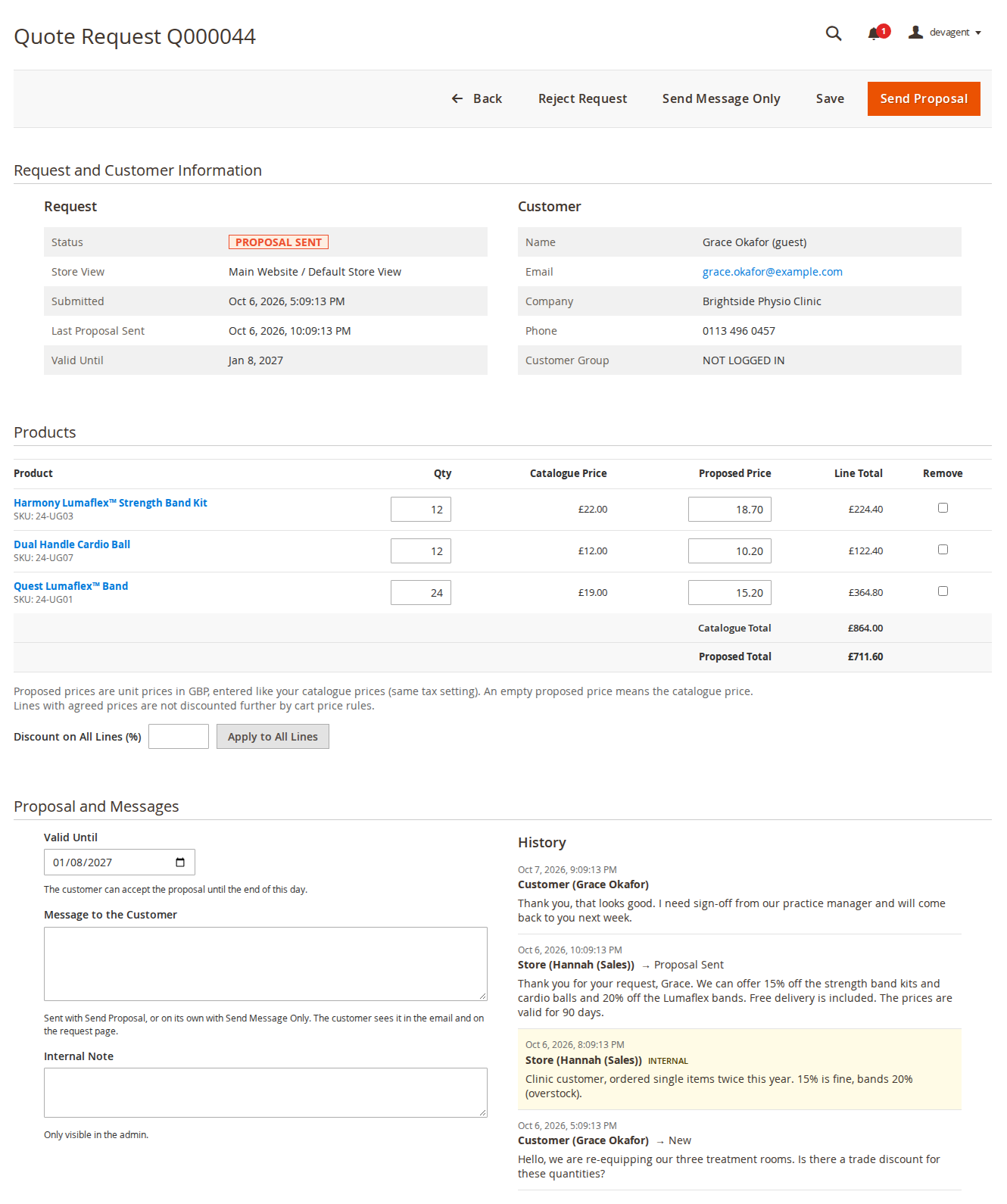
The buyer collects products in a quote basket, from the product page, from category lists if you enable it, or by moving the whole shopping cart into a quote. They add a comment and send it. Your team opens the request under CommerceGears > Request a Quote > Quote Requests, changes quantities, enters a proposed unit price per line, or uses Discount on All Lines (%) to apply one percentage everywhere, sets a valid-until date and sends the proposal with a message. Internal notes stay in the admin.
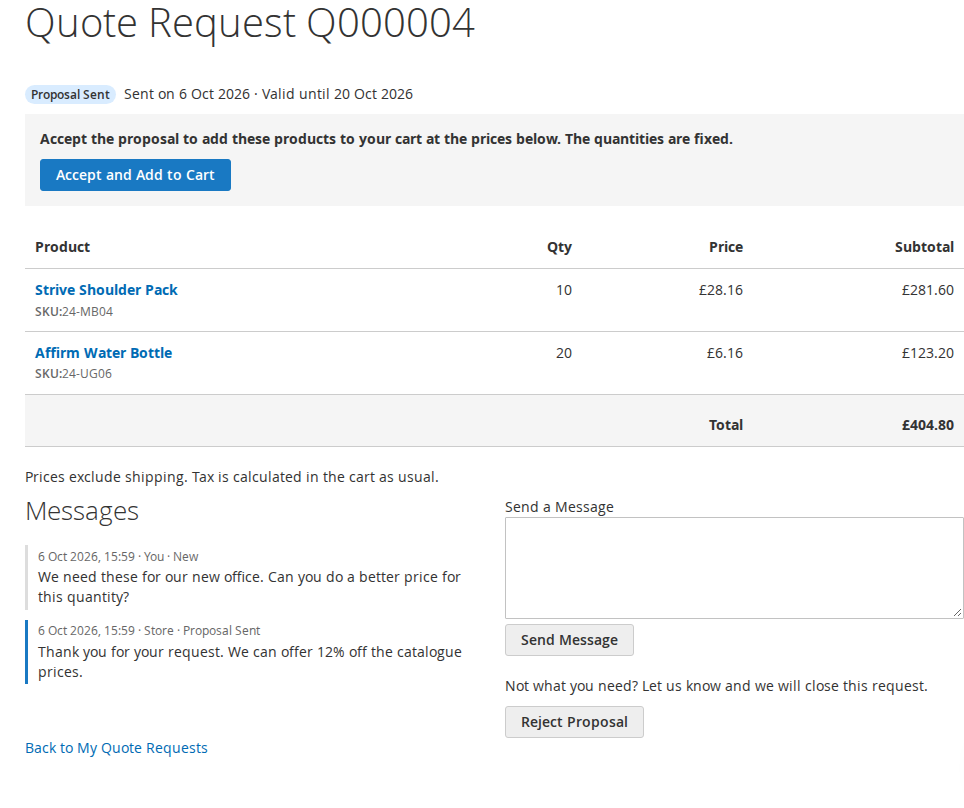
The buyer sees the proposal under My Account > My Quote Requests, or through a personal link if they asked as a guest. They can accept it, reject it, or send a message back. Every message and status change goes into the request's history, so the negotiation is in one place rather than spread over inboxes.
What happens when the buyer accepts
This is the part that replaces the coupon code. Accepting puts every line into the buyer's cart with the agreed unit price and the agreed quantity, and the line shows the quote reference, for example "Quote: Q000012 (agreed price, fixed quantity)", in the cart, checkout, order and e-mails. The buyer then checks out normally, with whichever payment and shipping methods you offer.
The cart holds the agreement in place:
- The quantity of a quoted line cannot be changed. It is set back before every totals calculation, including through REST and GraphQL, with a notice in the cart.
- Only one cart line per quote line gets the agreed price. The same product added the normal way is a separate line at the normal price.
- Cart price rules do not discount the agreed price further. Other products in the same cart are discounted as usual.
- The price applies only while the request is accepted and not past its valid-until date. After that, the line falls back to the normal price.
Proposals past their date are set to Expired by an hourly cron job and can no longer be accepted, so make sure Magento's cron runs. When the order is placed, the request becomes Ordered, links to the order, and the order gets an internal comment naming the quote.
Two design decisions are worth knowing. Once a buyer has accepted, the store cannot reject the request, because at that point the agreed lines are already in the buyer's cart; you can only send a new proposal. The buyer can still withdraw until they order. And rejected or expired requests can be reopened on purpose with a new proposal, for example when you want to offer a better price after a "no".
Where it stops
The admin cannot add new products to a request, only change quantities and prices or remove lines; the buyer sends a new request for other products. Prices are kept in the website's base currency, and the cart converts them into the buyer's display currency. If the buyer edits the options of a quoted line in the cart, it becomes a normal line at the normal price. Products with a file upload option cannot be quoted. Quote requests accept quantities above your stock level, which trade buyers often need, and stock is checked when the buyer accepts.
It also does not replace a proper enquiry form for products that are not in your catalogue at all. If what arrives is "can you make forty of these in our colours?", a form that asks the right questions works better, which is what our post on quote request forms is about.
If you sell to a handful of trade accounts and quote a few times a month, admin order creation with a custom price may be all you need. If quotes are a regular part of how you sell, the Request a Quote product page links to a demo with example requests in every status.
Sources
- Magento Open Source 2.4.9 source code,
app/code/Magento/Sales/view/adminhtml/templates/order/create/items/grid.phtml("Custom Price" on order lines in admin order creation), checked 26 October 2026. ↩ - Adobe Commerce Admin documentation, "Negotiable Quotes", https://experienceleague.adobe.com/en/docs/commerce-admin/b2b/quotes/quotes, checked 26 October 2026. ↩
- CommerceGears, Request a Quote user guide, sections 4 to 6, https://commercegears.com/user-guides/magento-2-extensions/request-a-quote/, checked 26 October 2026. ↩
From our shop
Related Products
-
Request a Quote
Shoppers ask for a price from the product page or the cart, you reply with a proposal from the admin, and the agreed prices go into their cart, locked. Quick order and hidden prices included.
- Magento 2.4.6 – 2.4.9
- Hyvä
- Luma
- Version v2.0.6
$229
-
Customer Approval
New customer accounts wait for your approval before they can sign in, with rules per website, an approval queue and emails to your team and your customers.
- Magento 2.4.6 – 2.4.9
- Hyvä
- Luma
- Version v2.1.1
Free
-
Custom Form
Build contact, enquiry, quote and survey forms in the admin by drag and drop, with conditional fields, steps, file uploads, replies and My Account, for Luma and Hyvä.
- Magento 2.4.7 – 2.4.9
- Hyvä
- Luma
- Version v2.1.1
$249