User guide
Promo Coupon Wallet for Magento 2: User Guide
Give customers their own coupons, show them in the account, mini cart, cart and checkout, and suggest the coupon that saves the most on the current basket.
- Version 2.0.2
- Magento 2.4.7 to 2.4.9
- PHP 8.2 to 8.5
- Hyvä and Luma
Give customers their own coupons and let them use them with one click. Customers see their coupons in My Account, the mini cart, the cart and the checkout, each with the discount, the reason they got it, the minimum basket and the expiry date. The wallet works out which coupon saves the most on the current cart and suggests it. This guide covers installation, settings, giving coupons, what customers see, the APIs and permissions.
- Changelog: Release notes · Questions: FAQ

1. Requirements
| Magento | Open Source or Adobe Commerce 2.4.7 to 2.4.9 |
| PHP | 8.2 to 8.5 |
| Themes | Luma, Blank and themes based on them; Hyvä 1.3 and later (checkout through the Luma checkout fallback) |
| Other | commercegears/module-core and commercegears/module-promo-core (both installed automatically) |
2. Installation
Install with Composer from repo.commercegears.com. Your access keys and the full set-up are described at https://commercegears.com/composer-access/.
composer config repositories.commercegears composer https://repo.commercegears.com
composer config --auth http-basic.repo.commercegears.com PUBLIC_KEY PRIVATE_KEY
composer require commercegears/module-promo-coupon-wallet
bin/magento setup:upgrade
bin/magento setup:di:compile            # production mode only
bin/magento setup:static-content:deploy # production mode only
bin/magento cache:flush
On Hyvä, run your usual Tailwind build after installing (the module registers itself for Hyvä's Tailwind source scanning). The wallet is switched on after installation; it shows nothing until a customer has a coupon.
To update later: composer update commercegears/module-promo-coupon-wallet, then the same bin/magento commands.
3. Settings
Stores > Configuration > CommerceGears > Coupon Wallet (also CommerceGears > Promotions > Coupon Wallet: Settings). Most settings can be set per website or store view.
General
| Setting | Default | What it does |
|---|---|---|
| Enabled | Yes | Shows the wallet on the storefront. Coupons you gave keep working when it is off. |
| Highlight Coupons Expiring Within (Days) | 3 | Such coupons show "Expires tomorrow" or "Expires in 2 days" in red. |
Where to Show the Wallet
| Setting | Default | What it does |
|---|---|---|
| Mini Cart | Yes | "You have 3 coupons" with a link to My Coupons and the best coupon for the cart. |
| Cart Page | Yes | The customer's coupons with Apply buttons, next to the discount code field. |
| Checkout | Yes | The coupons with Apply buttons in the payment step. |
Best Coupon Suggestion
| Setting | Default | What it does |
|---|---|---|
| Suggest the Best Coupon | Yes | Works out what each coupon saves on the current cart and marks the best one. |
| Coupons Compared per Cart | 10 | At most this many coupons are calculated for one cart (1 to 50). |
Giving Coupons
| Setting | Default | What it does |
|---|---|---|
| Default Validity (Days) | 30 | Pre-fills "Valid Until" when you give a coupon in the admin. 0 = no expiry. |
New Coupon E-mail
| Setting | Default | What it does |
|---|---|---|
| Allow Notification E-mails | No | Lets you tick "Notify the customer by e-mail" when giving a coupon. |
| E-mail Template | Coupon Wallet: New Coupon | Customise it in Marketing > Email Templates. |
| E-mail Sender | General Contact | Store e-mail identity used as sender. |
Nothing is sent when e-mail communications are disabled in Stores > Configuration > Advanced > System.
Coupon codes (Promotions core)
Stores > Configuration > CommerceGears > Promotions holds the settings shared by all promotion modules: code prefix (default SW-), length (10), format and dashes, "Only the Owner Can Use a Personal Coupon" (default Yes: a coupon given to a customer works only in that customer's cart) and the clean-up of unused expired codes.
4. Preparing a cart price rule
The wallet generates one code per customer on a cart price rule:
- Marketing > Cart Price Rules > Add New Rule.
- Name, websites, customer groups, and the discount under Actions (for example 10% off, or £5 off the cart).
- Coupon: Specific Coupon, tick Use Auto Generation. "Uses per Coupon" is set per code by the wallet.
- Optional conditions, for example "Subtotal (Excl. Tax) equals or greater than 50". The wallet reads a top-level subtotal condition and shows it as "Minimum basket £50.00".
- Save. The rule now appears in the wallet's rule lists.
You can also give an existing code (for example a shared code like SUMMER-VIP): it is assigned as it is, nothing is generated.
5. Giving coupons
To one customer
Customers > All Customers > edit a customer > tab Coupon Wallet.
- The table lists every personal coupon of the customer from all promotion modules: code, discount, reason, source, status (Active, Used, Expired, Revoked), issue and expiry date and the order it was used in.
- Give a coupon: choose a cart price rule or enter an existing code, enter the reason the customer sees (for example "Sorry for the late delivery"), the date it is valid until and the number of uses, optionally tick "Notify the customer by e-mail", then Give Coupon. The new code appears in the table at once.
- Revoke stops an active coupon: it disappears from the wallet and can no longer be applied.

To many customers from the grid
Customers > All Customers: select customers (filters work as usual), Actions > Give Coupon. On the next page choose the rule (or an existing code), the reason, the expiry and the e-mail option, then Give Coupons. Each customer gets their own code. Up to 2,000 customers at a time.
By CSV
CommerceGears > Promotions > Coupon Wallet: Assign by CSV.
email,rule,reason,expiry
jane@example.com,12,Thank you for your feedback,2026-12-31
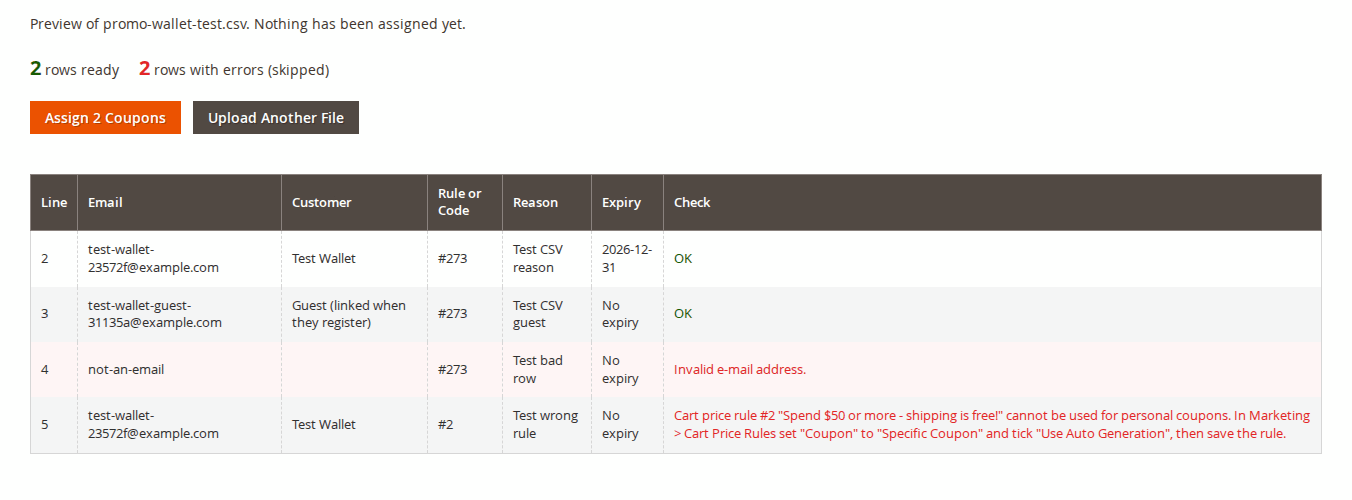
john@example.com,SUMMER-VIP,Welcome to our VIP club,ruleis a cart price rule ID (with "Use Auto Generation") or an existing coupon code;expiry(YYYY-MM-DD) is optional. Comma or semicolon separated, with or without a header row, up to 2,000 rows (2 MB).- Check File shows a preview: the customer the e-mail belongs to (or "Guest", linked when they register or log in), and errors per row (invalid e-mail, unusable rule, unknown code, past expiry...). Nothing is assigned yet.
- Assign N Coupons assigns the rows without errors. A preview can be used once.
6. What customers see
My Coupons
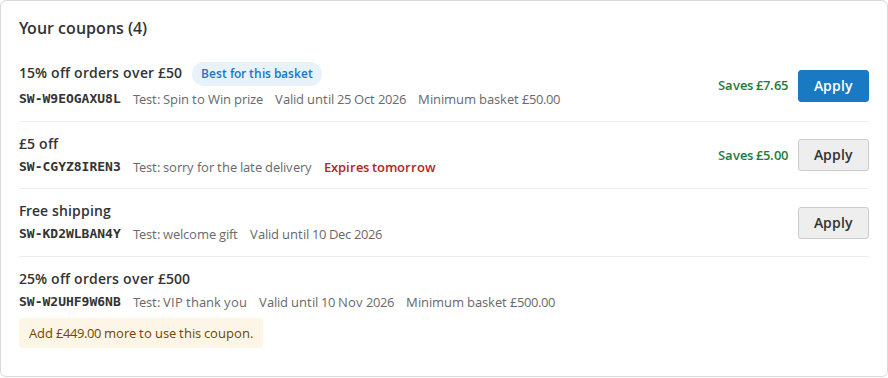
My Account > My Coupons lists the active coupons as cards:
- the discount in words ("15% off orders over £50", "£5 off", "Free shipping");
- the reason ("Thank you for your order", "Spin to Win prize") or the promotion that gave it;
- the code with Copy code;
- the expiry ("Valid until 25 Oct 2026", "Expires tomorrow" in red), the minimum basket and the saving on the current cart ("Saves £10.20");
- Apply to basket (when the cart has items), "Best for your basket" on the best coupon, and Apply best coupon at the top;
- coupons that do not fit the cart yet explain why: "Add £432.00 more to use this coupon."
Used, expired and revoked coupons are listed under "Used and expired coupons" (collapsed).
Mini cart
"You have 3 coupons" with a link, and the best coupon for the cart: "Use SW-XK4UV54VH1 to save £10.20".

Cart and checkout
The cart page lists the coupons next to the discount code field with Apply (and Remove for the applied one). In the checkout payment step the same list appears above the discount code field; Apply uses Magento's normal coupon request, so the order summary and payment methods update. All of Magento's coupon checks apply.
Hyvä
My Coupons, the cart and the cart drawer have Alpine.js and Tailwind templates. The checkout uses the Luma checkout fallback with the same wallet list.
7. Best coupon
For the current cart, each active coupon is calculated on an in-memory copy of the cart: totals with no coupon, then with each coupon. The saving is the extra discount (plus the shipping amount when a coupon makes shipping free and a method is chosen). The highest saving wins; on a tie the coupon that expires first. Nothing is saved and the customer's cart does not change. Results are kept for 5 minutes per cart state (items, quantities, subtotal, customer group, shipping method), and the calculation runs only where the wallet is shown.
8. Coupons from other promotions
Every promotion module of the family (Spin to Win, Scratch & Win, Exit Intent Offers, Next Order Coupon, Personalised Offers) issues its coupons through the Promotions core, so they appear in the wallet automatically with their own reason, and the best coupon logic considers them. CommerceGears > Promotions > Personal Coupons lists all of them.
9. APIs
REST (customer token):
curl -H "Authorization: Bearer CUSTOMER_TOKEN" https://example.com/rest/V1/commercegears/promo/mine/couponsGraphQL (customer token):
{ customerWalletCoupons { code label reason source_label expires_text min_subtotal applicable message estimated_discount is_best is_applied } }Both return the active coupons with what each does for the customer's current cart.
10. Reports
CommerceGears > Promotions > Overview shows the wallet as "Coupon Wallet" with coupons issued and used, the revenue of the orders that used them and the discount given, split by where they were given (customer page, customer grid, CSV import). CommerceGears > Promotions > Personal Coupons lists each coupon with its order.
11. Permissions (ACL)
| Resource | Allows |
|---|---|
| CommerceGears > Promotions > Coupon Wallet > Give and Revoke Wallet Coupons | Customer tab, grid action, CSV import |
| CommerceGears > Promotions > Coupon Wallet > Coupon Wallet Configuration | Settings |
The Personal Coupons grid and the Overview use the Promotions core resources.
12. Limitations
- The wallet is for logged-in customers; guests type their code.
- One coupon per cart (Magento standard): applying a wallet coupon replaces the coupon in the cart.
- The saving of a free shipping coupon is known once a shipping method is chosen.
- Savings are estimates; Magento calculates the final discount at checkout.
- Coupons given from the grid or by CSV are processed while you wait (up to 2,000 at a time).
13. Troubleshooting
- A rule is missing from the list: it must be active, "Specific Coupon" with "Use Auto Generation", and not past its end date.
- "This coupon is not valid" in the cart: the coupon expired, was revoked, belongs to another customer, or the rule's conditions (customer group, website, subtotal) are not met.
- No e-mail arrives: check Allow Notification E-mails and Magento's mail settings.
- Hyvä styles look unstyled: rebuild the Hyvä theme CSS.
14. Uninstall
bin/magento module:disable CommerceGears_PromoCouponWallet
composer remove commercegears/module-promo-coupon-wallet
bin/magento setup:upgrade
Coupons stay in the Promotions core and keep working as normal coupon codes.
This guide is for version 2.0.2 and also comes with the module, in docs/user-guide.md. All user guides