User guide
Free Gift for Magento 2: User Guide
Free gift offers as ordinary cart price rules: add gifts automatically or let customers choose, with a "Spend £X more" notice and gift lines labelled everywhere.
- Version 2.2.0
- Magento 2.4.6 to 2.4.9
- PHP 8.2 to 8.5
- Hyvä and Luma
Give free or discounted gifts with ordinary cart price rules. Gifts are added to the cart automatically or chosen by the customer on the cart page, and a "Spend £X more to get a free gift" notice shows how close the cart is. This guide covers installation, settings, setting up offers, what customers see, the report and the command line.
- Demo (Luma): https://demo.commercegears.com/joust-duffle-bag.html
- Demo (Hyvä): https://demo.commercegears.com/hyva/joust-duffle-bag.html
- Admin demo: https://demo.commercegears.com/try-admin/free-gift
- Changelog: Release notes · Questions: FAQ
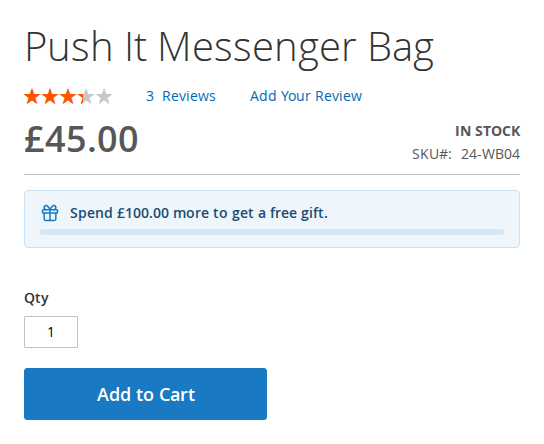
On the demo, the Joust Duffle Bag page shows the spend-more notice of a "spend £100, get a free tote bag" offer. Add four of them (£116) to the cart and the tote bag is added for free.

1. Requirements
| Magento | Open Source or Adobe Commerce 2.4.6 to 2.4.9 |
| PHP | 8.2 to 8.5 |
| Themes | Luma, Blank and themes based on them; Hyvä 1.3 and later (checkout through the Luma checkout fallback) |
| Other | commercegears/module-core (installed automatically) |
2. Installation
Install with Composer from repo.commercegears.com. Your access keys and the full set-up are described at https://commercegears.com/composer-access/.
composer config repositories.commercegears composer https://repo.commercegears.com
composer config --auth http-basic.repo.commercegears.com PUBLIC_KEY PRIVATE_KEY
composer require commercegears/module-free-gift
bin/magento setup:upgrade
bin/magento setup:di:compile            # production mode only
bin/magento setup:static-content:deploy # production mode only
bin/magento cache:flush
On Hyvä, run your usual Tailwind build after installing (the module registers itself for Hyvä's Tailwind source scanning). The module is off after installation: switch it on under General > Enabled (section 3).
To update later: composer update commercegears/module-free-gift, then the same bin/magento commands.
3. Settings
Stores > Configuration > CommerceGears > Free Gift (also CommerceGears > Free Gift > Configuration). All settings can be set per website and store view.
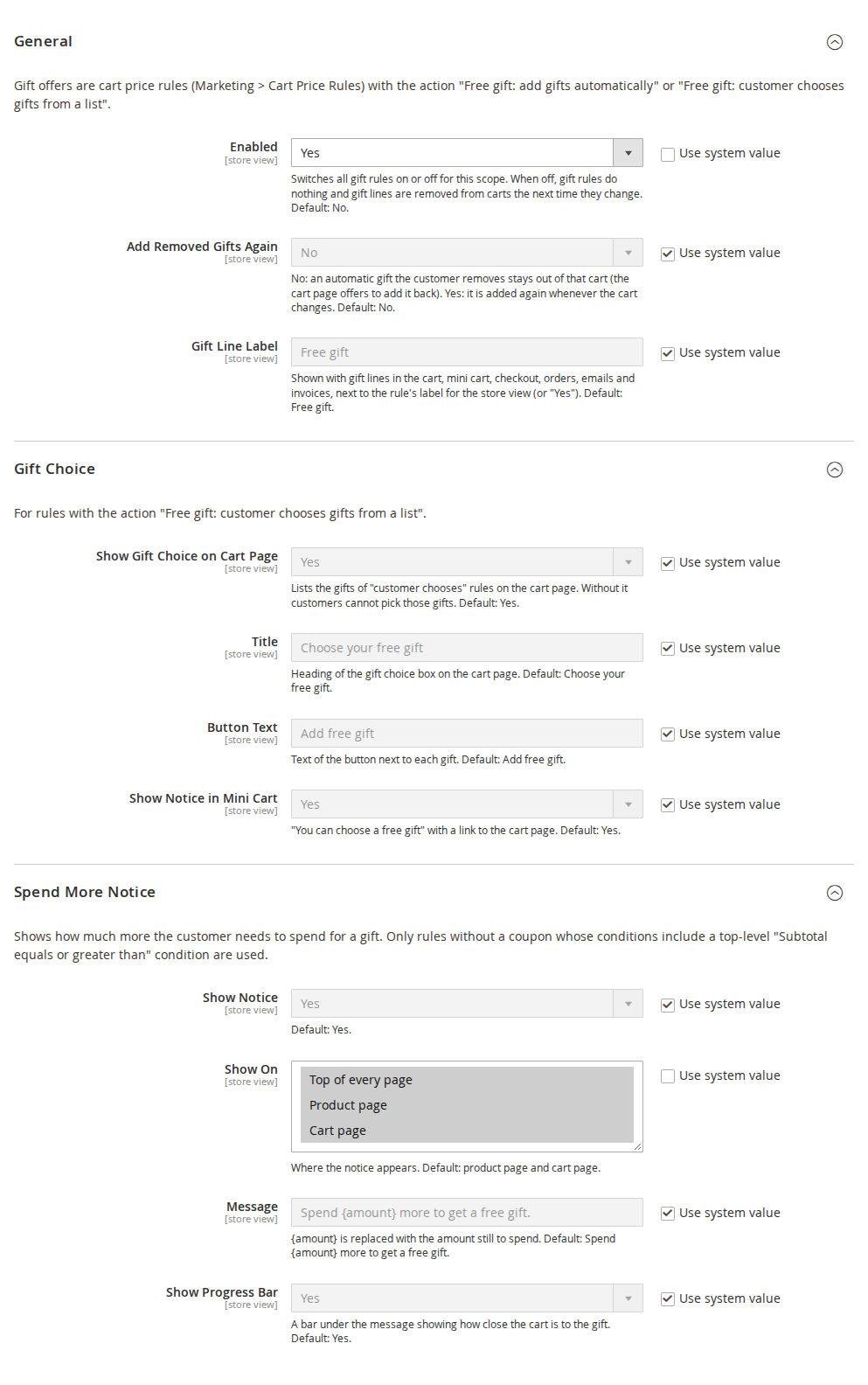
General
| Setting | Default | What it does |
|---|---|---|
| Enabled | No | Switches all gift rules on or off for this scope. When off, gift rules do nothing and gift lines are removed from carts the next time they change. |
| Add Removed Gifts Again | No | No: an automatic gift the customer removes stays out of that cart (the cart page offers to add it back). Yes: it is added again whenever the cart changes. |
| Gift Line Label | Free gift | Shown with gift lines in the cart, mini cart, checkout, orders, emails and invoices, next to the rule's label for the store view (or "Yes"). |
Gift Choice
For rules with the action "Free gift: customer chooses gifts from a list".
| Setting | Default | What it does |
|---|---|---|
| Show Gift Choice on Cart Page | Yes | Lists the gifts on the cart page. Without it customers cannot pick those gifts. |
| Title | Choose your free gift | Heading of the gift choice box. |
| Button Text | Add free gift | Text of the button on each gift. |
| Show Notice in Mini Cart | Yes | "You can choose a free gift" with a link to the cart page. |
Spend More Notice
| Setting | Default | What it does |
|---|---|---|
| Show Notice | Yes | Shows how much more the customer needs to spend for a gift. |
| Show On | Product page, Cart page | Top of every page, Product page, Cart page. |
| Message | Spend {amount} more to get a free gift. | {amount} is replaced with the amount still to spend. |
| Message for the Next Gift | You have a free gift. Spend {amount} more to also get {gift}. | Used once the cart has earned a gift and a bigger offer is in reach. {gift} is the name of the next gift, or "another free gift" when that offer has several. |
| Show Progress Bar | Yes | A bar under the message showing how close the cart is to the gift. |
The notice uses active gift rules without a coupon (for the shopper's website and customer group) whose conditions contain a top-level "Subtotal (Excl. Tax)", "Subtotal (Incl. Tax)" or "Subtotal after discount" with "equals or greater than" or "greater than". Other conditions of those rules are not evaluated for the notice.
4. Setting up an offer
- Marketing > Cart Price Rules > Add New Rule (also CommerceGears > Free Gift > Gift Rules (Cart Price Rules)). Enter a name, websites, customer groups and, if you want, a coupon, dates and uses per customer.
- Conditions, for example "Subtotal (Excl. Tax) equals or greater than 100".
- Actions > Apply: "Free gift: add gifts automatically" or "Free gift: customer chooses gifts from a list". The discount fields are hidden for these actions. Optionally, "Apply the rule only to cart items matching the following conditions" decides which items count for For Every X Items Bought.
- Free Gift section: the gift settings below.
- Labels (optional): a store label, shown next to "Free gift" on gift lines and above the gift choice.

| Field | What it does |
|---|---|
| Gift SKUs | Comma separated. Automatic gifts: simple or virtual products without options. Gifts to choose: simple, virtual or configurable products. Out-of-stock gifts are skipped. |
| Number of Gifts | Automatic gifts: quantity of each gift SKU. Customer chooses: how many gifts the customer can pick. |
| For Every X Items Bought | 0 gives the gifts once per cart. For example 2: the gifts are given for every 2 qualifying items (buy 2 get 1, buy 4 get 2). |
| Maximum Times per Cart | Used with "For Every X Items Bought". 0 means no limit. |
| Gift Price | Free (100% off), Percentage off the gift price, Fixed amount off the gift price, or Gift costs a fixed price. |
| Gift Discount or Price | A percentage above 0 and at most 100 (for example 50), or an amount in the base currency for "fixed amount off" and "fixed price". The rule is not saved when a gift SKU does not exist or the percentage is out of range. |
Several gift rules can apply to the same cart. Priority and "Discard subsequent rules" work as for any cart price rule.
5. What customers see
Spend-more notice. On the product page, the cart page and/or the top of every page: "Spend £100.00 more to get a free gift." with an optional progress bar. Once a gift is in the cart and a bigger offer is in reach, the notice names the next gift. A message tells the customer when an automatic gift is added or removed.
Automatic gifts. When the rule applies, the gift is added as its own cart line at the gift price, labelled "Free gift" with the rule's label. Its quantity cannot be changed. If the customer removes it, it stays removed for that cart and the cart page offers Add it back (unless "Add Removed Gifts Again" is Yes).

Gift choice. For "customer chooses" rules, the cart page shows the gifts with their regular price crossed out and an Add free gift button. Configurable gifts have a size and colour choice. The mini cart says "You can choose a free gift" with a link to the cart.
| Hyvä | Mobile |
|---|---|
 |  |
When the offer stops applying. If the cart no longer qualifies (subtotal too low, coupon removed, another customer group after sign-in), the gift line is removed and the cart explains why.
Checkout, orders and documents. Gift lines keep their "Free gift" label in the checkout summary, the customer's and the admin's order views, order, invoice and credit memo emails and PDFs.
Guests and customers. Both get gifts. When a guest signs in, the carts are merged without duplicate gifts.
6. Gifts Given report
CommerceGears > Free Gift > Gifts Given lists every gift line of every order: purchase date, order, gift rule (linked, or "Deleted rule (ID n)"), gift SKU, gift, quantity, regular value, customer email and name, order status and store. It has filters and CSV and XML export.
7. Command line
bin/magento commercegears:free-gift:rules [--rule=ID]Lists the gift rules with their gift SKUs and whether each gift can currently be given (exists, enabled, in stock). Use it after catalogue changes to find offers whose gifts can no longer be added.
8. Permissions (ACL)
| Resource | Allows |
|---|---|
| CommerceGears > Free Gift | The Free Gift menu |
| Gifts Given Report | The report and its export |
| Free Gift Configuration | The configuration section |
| Marketing > Cart Price Rules (Magento) | Creating and editing gift rules |
9. Limitations
- Gifts are managed in storefront, REST and GraphQL carts. Orders created in the admin do not get gifts added.
- Multishipping checkout is not supported for gift lines.
- Hyvä Checkout is not supported; the Luma checkout fallback is.
- Bundle, grouped, downloadable products with links and products with required custom options cannot be gifts.
- The spend-more notice is based on subtotal conditions only (see section 3).
- Gift settings are not part of the cart price rule REST API; they are kept when a rule is saved through the API.
10. Troubleshooting
| Problem | Solution |
|---|---|
| No gift is added | Check General > Enabled for the store view, that the rule is active for the website and customer group, and that its conditions are met. Run bin/magento commercegears:free-gift:rules to check the gift SKUs. |
| A gift is skipped | The gift product is out of stock, disabled, not in the website, or a type that cannot be a gift. |
| No gift choice on the cart page | Check Gift Choice > Show Gift Choice on Cart Page and that the rule's action is "customer chooses". |
| The spend-more notice does not show | The rule needs a top-level subtotal condition and no coupon; check Show On and flush the cache. |
| The gift appears twice | It cannot be added as a normal paid line through Reorder or a wish list; if a customer adds the same product from the catalogue, it is a separate, paid line by design. |
11. Uninstall
bin/magento module:disable CommerceGears_FreeGift
composer remove commercegears/module-free-gift
bin/magento setup:upgrade
Before uninstalling, deactivate or delete the gift rules: their action is provided by this module. The table commercegears_free_gift_rule and the columns quote.commercegears_free_gift, quote_item.commercegears_gift_rule_id and sales_order_item.commercegears_gift_rule_id keep their data until you drop them.
This guide is for version 2.2.0 and also comes with the module, in docs/user-guide.md. All user guides